-
Notion is a powerful, all-in-one tool for managing tasks, projects, and collaboration.
-
It offers customizable layouts using "blocks," enabling users to create personalized workflows.
-
Integrates with Google Calendar, making scheduling and team updates effortless.
-
Best practices include using shared databases, synced blocks, and callouts for team organization.
Unlocking Productivity with Notion: A Simple Guide for Beginners
5 min read

What is Notion?
Notion is a singular place for planning, writing, and thought. Record ideas and oversee tasks. It is a vital tool for organizing tasks, scheduling, and information exchange, among other elements of projects. Ivan Zhao, Chris Prucha, Jessica Lam, Simon Last, and Toby Schachman formed Notion Labs, Inc. as a startup in San Francisco, California, in 2013.
Why is Notion Useful for Modern Workflows?
Prior to Notion, the most popular applications were Trello for project management, Google Keep for to-do lists, and Evernote & Google Docs for capturing notes. Notion provides extremely adjustable layouts. The location and style of writing are completely up to you when you write in a notebook.
The blocks, which resemble Lego components, are used to construct the layouts. Every block has the tools you need to take notes, including the ability to highlight text, make lists, and more. Toggle blocks, which allow all the information to collapse into one single location, are among the greatest features.
In addition to being used for taking notes, the interface may be applied to many other project management activities, such as creating a to-do list and a Kanban board. Notion has a strong feature called nesting, which allows subtasks to be nestled. You may design whatever kind of arrangement you need by rearranging the bricks. It's simple to move between projects in the workspace.
A left sidebar provides easy access to all of the projects as well. Regardless of where you are in the ongoing process. It is quick and simple to move on to a new project. It functions as an adaptable database into which photos, PDFs, and other media may be inserted.
Getting Started with Notion: A Quick Overview
Head to Notion’s website and create an account using your email or Google credentials. Once you've signed up, Notion will prompt you to create or join a workspace, which acts as the central hub for your projects and tasks.
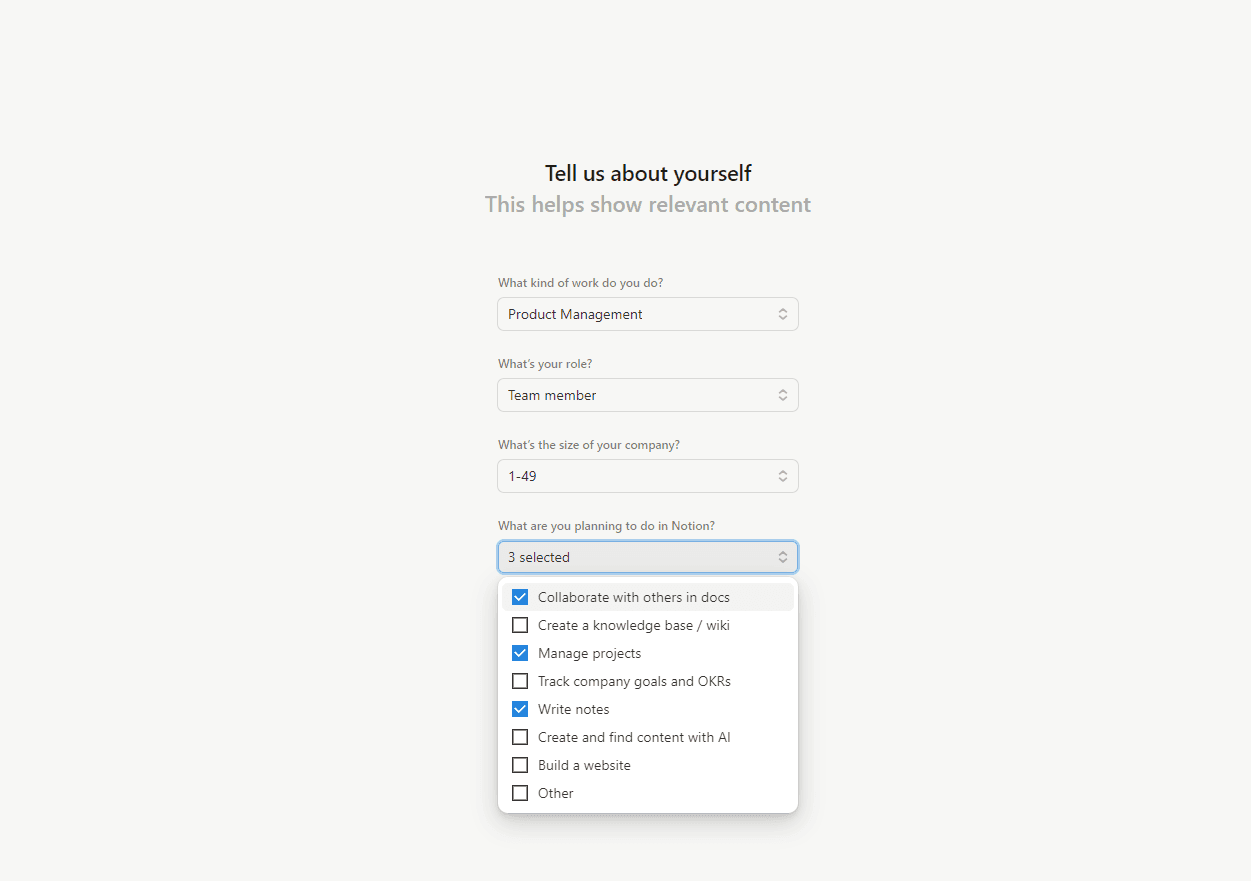
Onboarding
The simple steps involved in onboarding with notion, you need to provide information about your team, what type of projects you will be working on, your personal project name, etc.
Understanding the Interface
Notion’s interface is intuitive and user-friendly. On the left side, you’ll find your sidebar, where all your workspaces, pages, and sections are neatly organized. From here, you can quickly access your notes, projects, or templates.
Main Area
Main area is the space where you create and view content.
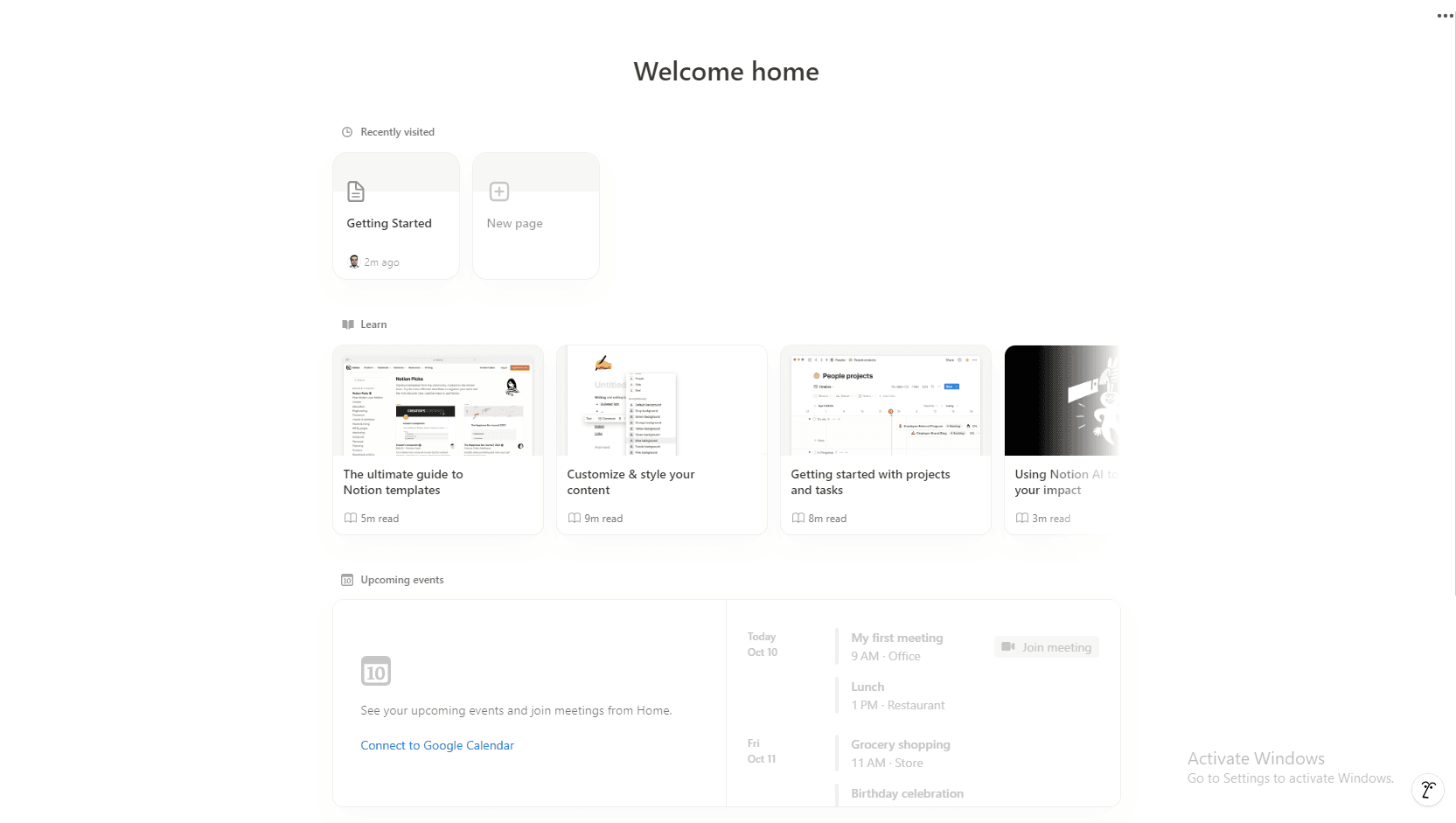
Notion Calendar
Integrated with google calendar, you can schedule meetings and important events in Notion and keep your team notified about things going around.
Project Creation
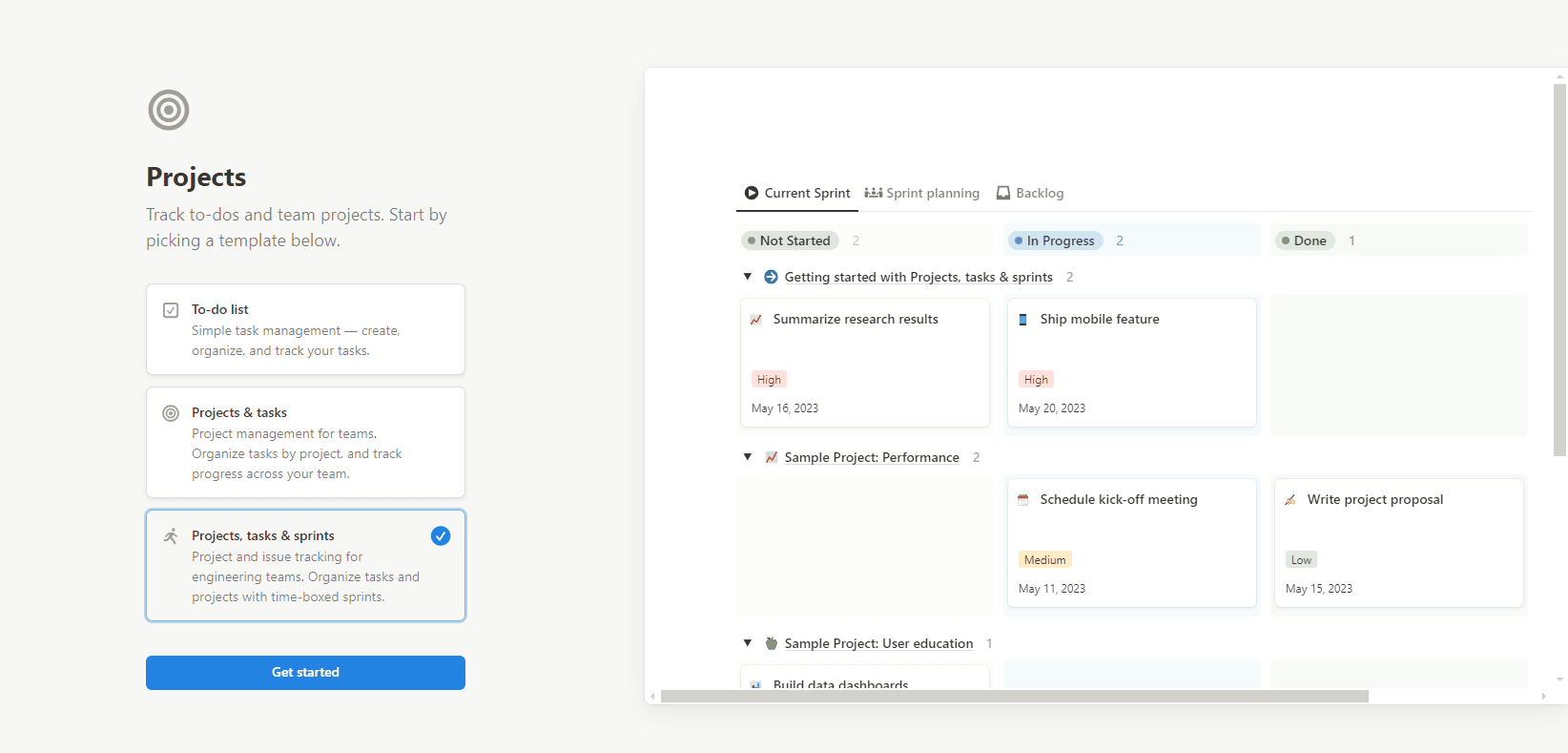
Notion provides their users with features for project management with creating backlogs, project tasks, and sprints included. You can simply create your own project, define the scopes and sprints in Notion web application, define tasks, sprints, and assign to team mates. It helps to keep a track of how your workflow is arranged and the state of your team’s progress. Notion allows you to rearrange blocks simply by dragging and dropping them. This makes organizing pages a breeze. You can further personalize your pages with icons, cover images, and colors, making your workspace visually appealing and tailored to your preferences.
5 Best Practices for Long-term Success with Notion
- Shared database: Make top-level pages in your sidebar for meeting notes and documents, so that everyone on your team knows where to go for changes. Use shared databases for all forms of communication. To assist in identifying the kinds of meetings (such as "Sales" or "All-hands") or announcements (such as "Process change") that are stored in your documents database, you may utilize the Select properties feature.
- Inheritance: Shared pages, together with their "child" or sub-pages, take on the configurations of their "parent." You may use the Share menu to lower permissions for any sub-pages.
- Callouts: Callouts may be used to highlight the most crucial areas of your document. These are frequently used by internal teams to provide their documents structure and an explanation of what a part is for.
- A monthly newsletter: Spend some time emphasizing important details about your team. This is also excellent for orienting new hires. To acquaint the rest of the staff with your new personnel, you may even make a Gallery database with their pictures.
- Synced Blocks: Some information, such as the goal statement of your business, may be available in many locations. Previously, you had to locate and amend each location where the task was mentioned everytime it was updated. However, now that Synced Blocks are in place, the corporate mission may be revised once and it will update globally.
Frequently Asked Questions
Yes, Notion offers a free version with essential features like note-taking, project management, and collaboration. There are also paid plans for teams or individuals needing advanced features.

We are the Mediusware Editorial Team, passionate about crafting insightful content on technology, software development, and industry trends. Our mission is to inform, inspire, and engage our audience with well-researched articles and thought leadership pieces. With a deep understanding of the tech landscape, we aim to be a trusted source of knowledge for professionals and enthusiasts alike.
Featureblogs
Relatedblogs
01
How to Create a Stunning WordPress Website in 2024: Step-by-Step Tutorial02
How Mediusware Empowered Protesters, Strengthened the Economy & Showcased Employee Resilience in the 2024 Movement03
Mastering Error Handling in Rust with Essential Techniques04
Best Practices for Writing Clean Code05
Let's Deep Dive Into Threads with Rust