- Shows how to install and run RabbitMQ locally or with Docker.
- Explains how to create a Python publisher and multiple subscribers with
pika. - Walks through setting up a fanout exchange to broadcast messages.
- Covers message acknowledgments, durable queues, and real-world use cases.
Building a Pub/Sub System in Python with RabbitMQ
5 min read
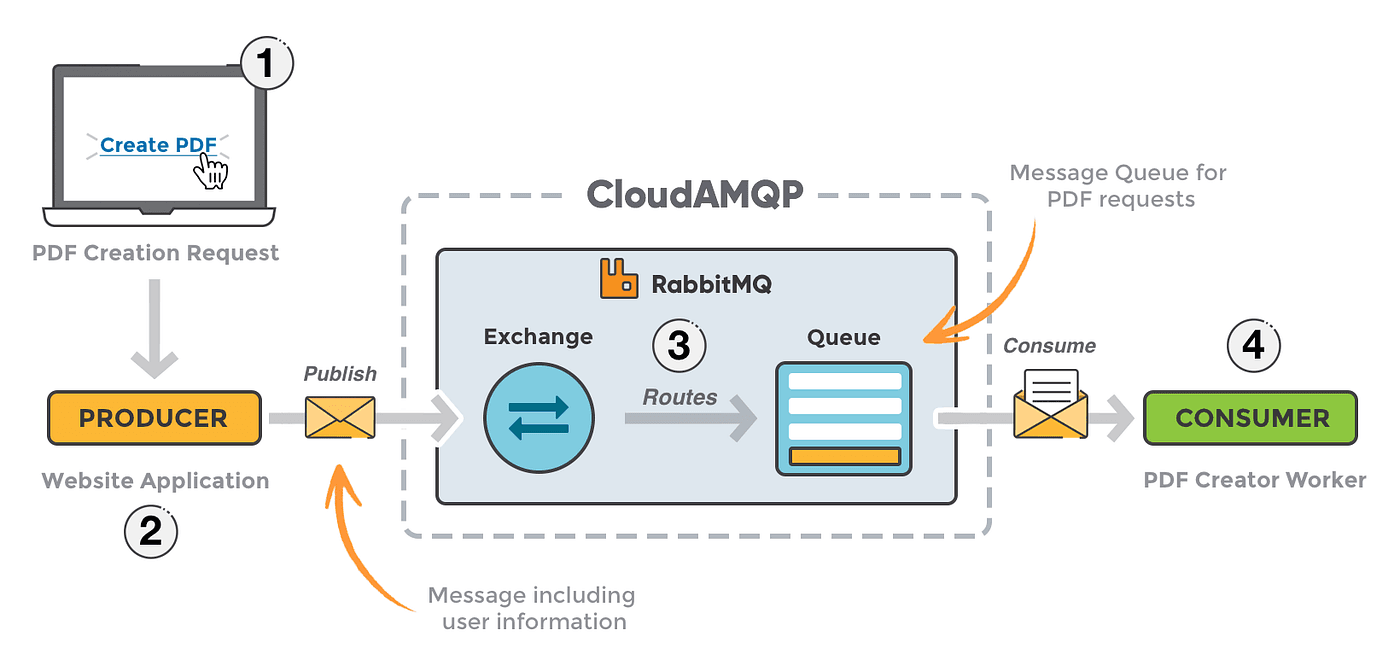
RabbitMQ is a powerful message broker that supports multiple messaging patterns, one of the most popular being publish/subscribe (pub/sub). This pattern allows a producer to send a message that multiple subscribers can receive and process independently.
In this blog, we’ll build a simple pub/sub system in Python using RabbitMQ.
Our setup will include.
- A producer that publishes messages.
- Multiple subscribers that receive every message published by the producer.
Prerequisites
- Install RabbitMQ on your system. Follow the official guide or use Docker for your operating system (I use Docker in this blog to install RabbitMQ).
- Install the pika library for Python:
pip install pika
Install RabbitMQ in the Docker (Optional)
Ensure Docker is installed on your system. If not, download and install it from the Docker website.
1. Pull the RabbitMQ Docker Image
RabbitMQ provides an official Docker image. Pull the latest version using the following command:
docker pull rabbitmq:managementThe management tag includes the RabbitMQ Management Plugin, providing a user-friendly web interface for monitoring and managing RabbitMQ.
2. Run the RabbitMQ Container
Run the RabbitMQ container with the management plugin enabled:
docker run --name rabbitmq -p 5672:5672 -p 15672:15672 rabbitmq:management- 5672: Default port for RabbitMQ messaging.
- 15672: Port for the RabbitMQ Management Web Interface.
- --name rabbitmq: Assigns the name rabbitmq to the container.
3. Access the RabbitMQ Web Interface
- Open a browser and navigate to:
http://localhost:15672 - Use the default login credentials:
- Username: guest
- Password: guest
How Pub/Sub Works in RabbitMQ
In RabbitMQ, the pub/sub pattern is implemented using exchanges and queues:
- The producer sends messages to an exchange.
- The exchange routes these messages to all queues bound to it.
- Each subscriber listens to a specific queue and processes incoming messages.
We’ll use the fanout exchange type, which ensures that every queue bound to the exchange receives a copy of the message.
Setting Up the Producer.
Here’s how the producer sends messages to the exchange:
# producer.py
import pika

def publish_message(message):
    # Connect to RabbitMQ
    connection = pika.BlockingConnection(
        pika.ConnectionParameters(
            host="127.0.0.1",
            port="5672",
            credentials=pika.credentials.PlainCredentials(
                'guest',
                'guest',
            )
        ),
    )
    channel = connection.channel()

    # Declare the exchange
    channel.exchange_declare(exchange='logs', exchange_type='fanout')

    # Publish the message
    channel.basic_publish(exchange='logs', routing_key='', body=message)
    print(f"Sent '{message}'")

    # Close the connection
    connection.close()

if __name__ == "__main__":
    message = "Hello, Subscribers! This is a test message."
    publish_message(message)
Creating a Subscriber
Each subscriber listens to messages from a queue bound to the exchange. Here’s the subscriber code:
# subscriber.py
import pika

def consume_messages(subscriber_id):
    # Connect to RabbitMQ
    connection = pika.BlockingConnection(
        pika.ConnectionParameters(
            host="127.0.0.1",
            port="5672",
            credentials=pika.credentials.PlainCredentials(
                'guest',
                'guest',
            )
        ),
    )
    channel = connection.channel()

    # Declare the exchange
    channel.exchange_declare(exchange='logs', exchange_type='fanout')

    # Create a queue with a random name and bind it to the exchange
    result = channel.queue_declare(queue='', exclusive=True)
    queue_name = result.method.queue
    channel.queue_bind(exchange='logs', queue=queue_name)

    print(f"Subscriber {subscriber_id} waiting for messages. To exit press CTRL+C")

    # Callback function to process messages
    def callback(ch, method, properties, body):
        print(f"Subscriber {subscriber_id} received {body.decode()}")
        ch.basic_ack(delivery_tag=method.delivery_tag)

    # Start consuming messages
    channel.basic_consume(queue=queue_name, on_message_callback=callback)
    channel.start_consuming()

if __name__ == "__main__":
    subscriber_id = "1"  # Change this for different subscribers
    consume_messages(subscriber_id)
Testing the System
-
Start RabbitMQ: Ensure RabbitMQ is running on your system.
-
Run Subscribers: Open multiple terminal windows and start the subscriber script with different IDs:
python subscriber.py 1
python subscriber.py 2
Send Messages from the Producer: In another terminal, run the producer script:
python producer.pyEach subscriber should print the received message.
Understanding the Code
- Exchange: The
fanoutexchange type ensures every queue bound to it gets a copy of the message. - Temporary Queues: Subscribers use randomly named queues (
queue='') to receive messages. - Callback: The subscriber’s
callbackfunction processes incoming messages.
Real-World Applications
The pub/sub pattern is commonly used in:
- Broadcasting notifications to multiple services.
- Log aggregation systems.
- Real-time event streaming for microservices.
Final Thoughts
In this blog, we demonstrated how to implement a simple pub/sub system using RabbitMQ and Python. This foundation can be extended to build more complex distributed systems.
Let me know if you have any suggestions, or feel free to share your thoughts in the comments!
Frequently Asked Questions
Exchange: A message routing component that directs messages to queues based on rules defined by bindings. Queue: A buffer that stores messages until they are consumed by a subscriber.

I work at the point where product decisions, system architecture, and engineering execution meet. At Mediusware, I’m accountable for how technology choices affect reliability, scale, and long-term delivery for our clients.
Featureblogs
Relatedblogs
01
How to Create a Stunning WordPress Website in 2024: Step-by-Step Tutorial02
How Mediusware Empowered Protesters, Strengthened the Economy & Showcased Employee Resilience in the 2024 Movement03
Mastering Error Handling in Rust with Essential Techniques04
Best Practices for Writing Clean Code05
Let's Deep Dive Into Threads with RustAuthorblogs
01
How Digital Agencies Can Deliver Custom Software Without Hiring Developers02
AI in FinTech: Build, Buy, or Integrate? A Founder's Decision Framework03
How to Choose a SaaS MVP Development Company04
How Seed-Stage SaaS Teams Add Engineering Capacity Without Hiring Chaos05
Why Seed-Stage SaaS Startups Struggle to Ship Fast