- Learn why stable rankings can still hide serious revenue losses from zero-click searches.
- Prioritize commercial clicks, estimate pipeline risk, and recover high-value organic search opportunities faster.
Zero Clicks, Falling Traffic: How to Win Back Revenue
Published on: 15 September 2026
Last updated on: 15 September 2026

We all open Google Search Console as part of our regular SEO checks. Rankings look fine. Impressions are holding.
But clicks keep falling.
You are wondering, Is our SEO failing?
Not necessarily.
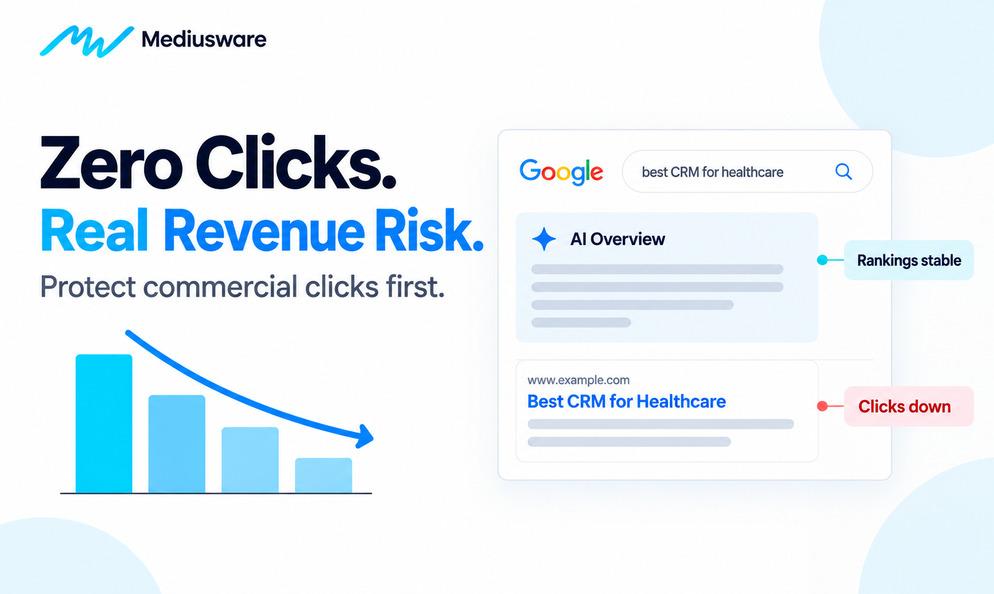
The problem is not ranking. The search results around it changed.
Google can now answer a search through an AI Overview, featured snippet, People Also Ask result, knowledge panel, or another SERP feature before the searcher ever reaches your website.
That is zero-click search.
In this guide, I’ll show you which lost clicks matter, what changed, and how to protect revenue.
When Clicks Fall, It Can Hurt More Than Traffic
It means people can get more answers directly from Google without visiting a website.
So the better question is:
Which clicks are you losing?

All 5 searches can bring organic traffic. But they do not bring the same business value.
If Google answers a simple informational query, you may only lose a pageview. But if a potential buyer gets enough information from the search results to compare options without visiting your service or comparison page, you could lose a real opportunity.
Thats why it should not be:
How do we recover every lost click?
But:
Which lost clicks were bringing people closer to buying?
As we explained in our guide to ranking on Google in 2026, rankings still matter. But rankings alone no longer show how much attention, traffic, or business opportunity your search visibility is creating.
Why Is Traffic Falling If Rankings Are Still Stable?
You check Search Console and your rankings have barely moved. But clicks are down.
The first instinct is often to rewrite the page, add more keywords, or make another SEO change.
Don’t start there. Start by finding out what actually changed. Rather, look at your impressions, clicks, CTR, average position, and conversions together.
| What you see | What it could mean |
| Rankings stable, impressions stable, clicks down | Searchers may be clicking less because the SERP changed |
| Rankings stable, impressions down | Fewer people may be searching for the topic |
| Rankings down, clicks down | You may have a ranking problem |
| GSC clicks stable, GA4 sessions down | Tracking may be the issue |
| Commercial clicks, conversions down | Revenue could be affected |
This is why a traffic drop should be diagnosed before it is fixed. Google also recommends checking Search Console and understanding the cause before making major changes.
A drop can come from ranking changes, technical issues, seasonality, lower search demand, algorithm updates, or changes in how people interact with the search results.
The difference matters. If your rankings are healthy but CTR is falling, rewriting the whole page to “rank better” may not help at all.
First find the problem. Then decide what needs fixing.
Search Console Now Show AI Search Visibility
This became much easier in 2026. Google introduced dedicated Generative AI performance reports in Search Console in June and stated that the reporting had rolled out to all websites worldwide by August 31, 2026.
The reports provide visibility into generative AI features such as AI Overviews and AI Mode. That changes how SEO teams can investigate performance.
The old reporting looked like this:
Ranking → Impression → Click
Now:
Ranking → AI visibility → Click → Conversion → Revenue
The AI report does not answer every question. You will still need Search Console, GA4, CRM data, and SERP tracking together.
But it gives you another piece of evidence. If rankings remain steady, AI visibility rises, and traditional CTR starts falling across the same topic, you have a much stronger reason to investigate zero-click behavior.
Do AI Overviews Reduce Organic Clicks?
Often, yes. But the impact is not the same for every search. The pattern is, when AI Overviews appear, traditional organic clicks often fall.
Pew Research found AI summaries cut Google click-throughs to 8% from 15%. Ahrefs found AI Overviews Reduce Clicks by 58%
But the story is not one-sided. Semrush found that zero-click rates actually moved from 38.1% to 36.2% after AI Overviews appeared for the same keyword set.
So, AI Overviews can reduce clicks, but the impact depends on the query, intent, and SERP layout.
Do not rely only on industry averages. Rather, look at your own data.
That is when you should investigate what changed in the SERP.
The Risk Is Commercial Search
For a long time, AI Overviews were associated mainly with informational questions. That is changing.
Semrush analyzed In 6 month more than 600,000 keywords across 10 industries and found that the share of commercial-intent SERPs containing AI Overviews increased by an average of 71%.
Transactional AI Overview appearances declined by 5% during the same study period, which is an important distinction.
That is precisely where many B2B buying decisions start to take shape.

Which Lost Clicks Are Worth Fighting For?
Not every lost click deserves the same level of attention. A better way to prioritize is by search intent and business value.
Informational searches help people learn. Commercial searches help them compare. Transactional searches usually mean they are closer to taking action.
Then look at what those pages have actually produced for the business.
| Page | Monthly click loss | Historical leads | Priority |
| Basic definition article | 1,400 | 1 | Low |
| Technical guide | 450 | 3 | Medium |
| Comparison page | 190 | 11 | High |
| Pricing page | 85 | 8 | Critical |
The definition article lost the most traffic. But the pricing page may have lost more business value.
That is the difference between traffic loss and opportunity loss. A page with fewer visitors can still matter more if those visitors are closer to becoming leads or customers.
This is why content should support the full customer journey, not just generate pageviews. Our Content Marketing and Lead Generation Guide explains how content can support awareness, consideration, and decision stages.
The simplest way to think about it is, Traffic tells you who arrived. Intent tells you why they came. Conversions tell you whether it mattered.
The Mediusware Zero-Click Revenue Priority Score
Most zero-click audits start with:
Which pages lost the most traffic?
That is useful, but it is not enough.
Rather:
Which lost clicks were most valuable to the business?
That is what the Mediusware Zero-Click Revenue Priority Score is designed to show.
Revenue Priority Score
CTR Loss × Commercial Intent × Conversion Value
Score commercial intent and conversion value from 1 to 5.

The pattern is clear. The informational page loses more CTR, but the commercial pages deserve more attention because those visitors are closer to becoming customers.
This is not a forecasting formula. It is a prioritization tool that helps teams decide where to act first.
The principle is simple, Prioritize revenue exposure, not traffic loss.
That keeps your team from spending weeks recovering traffic that rarely converts while higher-value buyer journeys continue to weaken.
How Much Revenue Is at Risk?
Once you know which pages matter, the next step is to put a business value behind the lost clicks.
For ecommerce,
Revenue at risk = Lost clicks × Conversion rate × Average order value
For B2B,
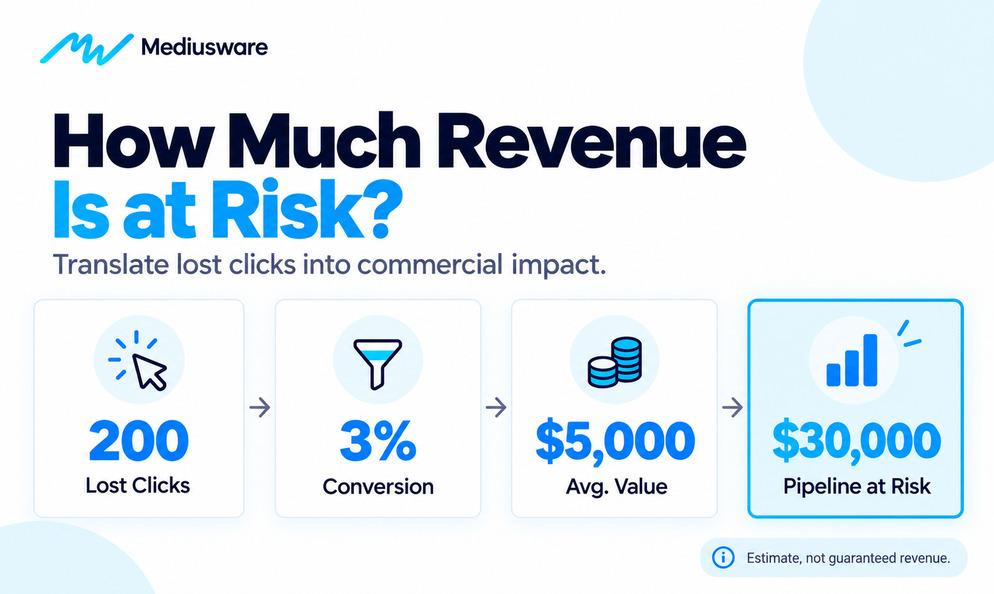
Pipeline at risk = Lost clicks × Opportunity conversion rate × Average opportunity value
Heres an example, A comparison page loses 200 organic clicks per month. Historically, 3% of those visitors become qualified opportunities, with an average opportunity value of $5,000.

That does not mean you definitely lost $30,000 in revenue. It is an estimate based on how that traffic has performed historically.
But it gives the business something more useful than:
Organic traffic dropped by 200 visits.
One tells you what happened to traffic. The other helps you understand what it could mean for the business.
Run a Traffic Loss Audit Before Changing Your SEO Strategy
A first-pass audit does not need to take days.
Step 1: Confirm the decline
Compare your most recent 90 days with the previous 90 days in Search Console. Also check year-over-year performance when your business has meaningful seasonality.
Look at clicks, impressions, CTR, average position, landing pages, and queries.
Step 2: Separate traffic by intent
Tag the queries and pages that matter most as informational, commercial, or transactional. Do not spend hours classifying thousands of low-volume queries.
Start with the pages generating the most traffic, leads, and revenue.
Step 3: Review the SERP
Check whether the affected searches now trigger AI Overviews, featured snippets, People Also Ask results, videos, shopping results, or other features.
Then compare that with Search Console's generative AI visibility data.
Step 4: Connect SEO to conversion data
Use GA4 and your CRM to identify which organic pages generate:
demos, leads, trials, purchases, qualified opportunities, or other meaningful actions.
Step 5: Estimate revenue exposure
Apply your historical conversion rates to the clicks that disappeared.
Do not present the result as guaranteed lost revenue. Use it as a prioritization estimate.
Step 6: Rank what deserves attention
Start with pages that combine declining click opportunity with strong buying intent and proven conversion value.
This keeps the team focused on what the business can actually feel.
How to Recover Revenue Without Chasing Every Lost Click
You cannot force Google to send every searcher to your website. But, you can give searchers stronger reasons to choose you when a click is necessary.
1. Publish valuable content hard to replace
Google's guidance for generative search emphasizes valuable, unique, non-commodity content. It specifically encourages original points of view, firsthand experience, useful structure, and content that adds something beyond what a generative system could easily reproduce from existing pages.
That means more, original data, project experience, expert judgment, frameworks, comparisons, real examples, useful tools, and evidence.
2. Make commercial pages worth visiting
A buyer comparing vendors usually needs details an AI summary cannot fully replace.
Give them, clear process, pricing context, trade-offs, timelines, relevant case studies, implementation details, comparisons, risks, proof, and answers to real sales questions.
For companies trying to connect search visibility with qualified leads and revenue.
3. Build demand for your brand
Generic search visibility can introduce a company. Brand demand makes it easier to find again.
Watch whether your search strategy is increasing:
branded queries, direct visits, return visitors, case-study views, service-page visits, and assisted conversions.
The click may happen later than it used to. That does not mean the earlier visibility had no value.
4. Connect informational content to buying decisions
An informational article should not become a dead end.
The path can look like:
Educational article → commercial comparison → case study → service page → conversation
Internal linking matters because it helps both readers and search engines understand where a topic leads next. Do not add links simply to hit a quota.
Link when the next page answers the reader's next logical question.
5. Protect high-intent searches across channels
SEO does not have to carry every commercial query alone.
If a strategically important SERP becomes crowded with AI features, paid search can help maintain visibility while organic performance evolves.
The same rule applies there: optimize for actions and revenue, not clicks. Our guide to high-converting Google Ads focuses on aligning search intent, landing pages, tracking, and conversion goals instead of treating traffic as the outcome.
Final Thoughts
Search is changing fast. Rankings still matter, but clicks alone no longer tell the full story. AI Overviews and zero-click results mean some traffic will disappear. The goal is not to recover every visit.
It is to protect the searches tied to real buying decisions. Focus on, Commercial intent. Brand visibility. Qualified traffic. Pipeline. Revenue.
Modern SEO is moving from ranking for attention to earning trust and business impact. If valuable search demand is slipping, Mediusware’s digital marketing team can help identify what is worth protecting first.
If valuable search demand is slipping, Mediusware’s digital marketing team can help identify what is worth protecting first.
Frequently Asked Questions
68.01% of U.S. Google searches ended without a click during the first 4 months of 2026. But this is overall search behaviour, not the traffic loss for an individual website.