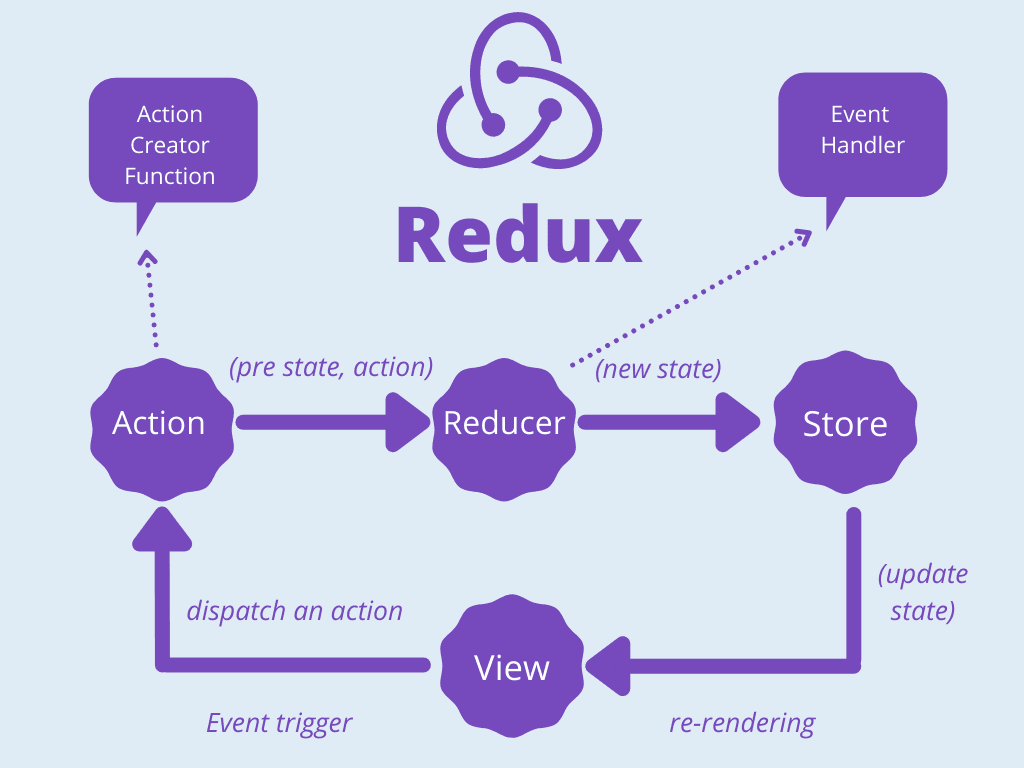
To integrate Redux into a React project, follow these steps:
1. Install Redux and React-Redux
To get started, you'll need to install two packages:
npm install redux react-redux
redux: This package provides the core Redux functionality.react-redux: This package offers bindings to connect Redux with React.
2. Create a Redux Store
The Redux store holds your entire application state. You can create a store using the createStore function provided by Redux.
Create a file called store.js:
import { createStore } from 'redux';
import rootReducer from './reducers';

const store = createStore(rootReducer);

export default store;
3. Combine Reducers (Optional)
In a large application, you will typically have multiple reducers. You can use the combineReducers function to combine them into one root reducer.
import { combineReducers } from 'redux';
import userReducer from './userReducer';
import postReducer from './postReducer';

const rootReducer = combineReducers({
  user: userReducer,
  posts: postReducer,
});

export default rootReducer;
Actions, Reducers, and Store
1. Define Actions
Actions are JavaScript objects that have a type field (a string that describes the action) and an optional payload (the data you want to send to the reducer).
// actions.js
export const incrementCounter = () => ({
  type: 'INCREMENT',
});

export const decrementCounter = () => ({
  type: 'DECREMENT',
});
2. Create Reducers
Reducers specify how the application state changes in response to actions. They accept two arguments: the current state and the action.
// counterReducer.js
const initialState = {
  count: 0,
};

const counterReducer = (state = initialState, action) => {
  switch (action.type) {
    case 'INCREMENT':
      return {
        ...state,
        count: state.count + 1,
      };
    case 'DECREMENT':
      return {
        ...state,
        count: state.count - 1,
      };
    default:
      return state;
  }
};

export default counterReducer;
3. Create the Store
Once the reducers are defined, create the Redux store:
import { createStore } from 'redux';
import counterReducer from './counterReducer';

const store = createStore(counterReducer);
Connecting Redux with React Components
To use Redux in your React components, you'll need to:
1. Use Provider to Pass the Store
The Provider component makes the Redux store available to your React components.
import React from 'react';
import ReactDOM from 'react-dom';
import { Provider } from 'react-redux';
import App from './App';
import store from './store';

ReactDOM.render(
  <Provider store={store}>
    <App />
  </Provider>,
  document.getElementById('root')
);
2. Use useSelector and useDispatch
useSelector: This hook allows components to access the Redux state.useDispatch: This hook lets components dispatch actions to the Redux store.
Example of using both:
import React from 'react';
import { useSelector, useDispatch } from 'react-redux';
import { incrementCounter, decrementCounter } from './actions';

const Counter = () => {
  const count = useSelector((state) => state.count);
  const dispatch = useDispatch();

  return (
    <div>
      <h1>{count}</h1>
      <button onClick={() => dispatch(incrementCounter())}>Increment</button>
      <button onClick={() => dispatch(decrementCounter())}>Decrement</button>
    </div>
  );
};

export default Counter;